Employee
Here the employee can do the following:
• View Leave Dashboard.
• Request leave.
• Confirm Duty Resumption.
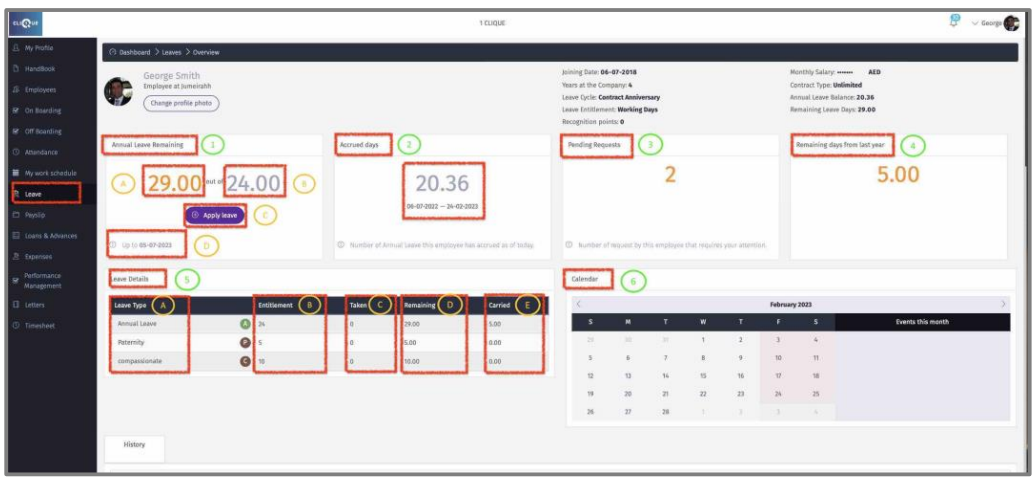
DashboardHere the employee can view the following:
1 - Remaining Annual Leave for the current year cycle. The below example shows that this employee has 29 (24 + 5 days carried forward from previous year) days remaining for this year that ends on July 5th, 2023.
o A – Remaining Annual Leave for the full year cycle. This number consists of (Leave carried forward from previous year + Annual entitlement – Days Taken this year – Unpaid leave
taken this year).
o B – Annual leave entitlement for this year.
o C – Click “Apply Leave” to request a leave.
o D – End date of the current Annual Leave Cycle.
2 – Accrued Days: Number of days that the employee has earned so far (Minus the Days Taken) out of the remaining days from the beginning of this current Leave Cycle till today.(If employee leaves the company, the accrued leave days will be paid in the final settlement, only).
3 – Pending Requests: Number of Leave requests that the employee have submitted that still require approval.
4 – Remining days from previous year: Number of days that carried forward from the previous year cycle.
5 – Leave Details: Table of all leave types for this employee:
o A – Leave Type.
o B – Yearly Entitlement.
o D – Remaining Days for this current leave Cycle.
o E – Days carried forward from previous year cycle.
6 – Calendar that shows the following:
o Weekends during the month.
o Any Requested Leaves.
o Any Public Holidays.
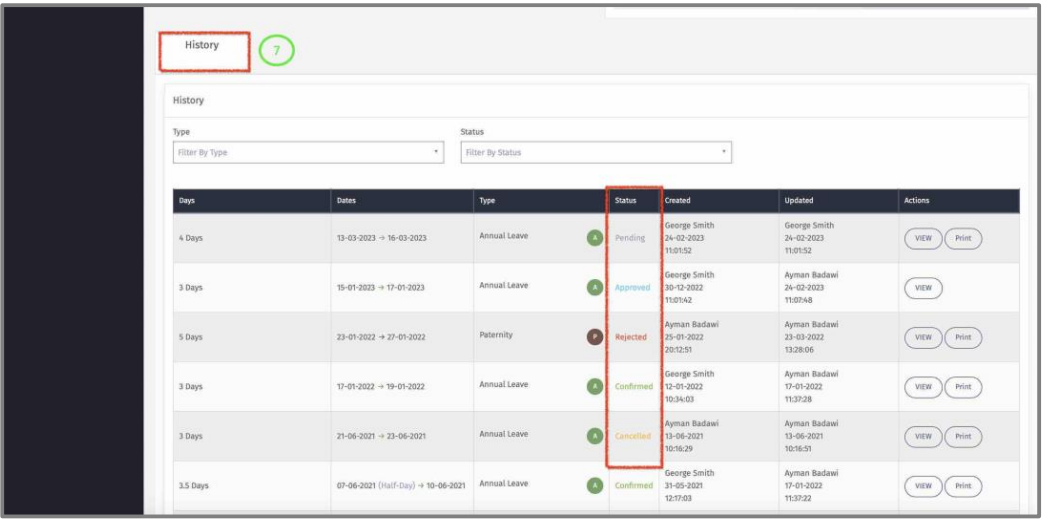
7 – History of all requested leaves by this employee and the status.
o Pending: Employee requested leave but has not been approved yet.
o Approved: Requested leave has been approved by manager(s).
o Rejected: Requested leave has been rejected by Manager(S).
o Confirmed: Employee has returned from leave, and it has been confirmed by
Employee/Manager(s).
o Cancelled: Requested leave has been cancelled by Employee/Manager(S).