Setup
To utilize the Timesheet Module, you need to go first to Company/Timesheet.
Here you can create the following to setup the Timesheet:
• Projects/Clients/Business Unit.
• Tasks/Items/Activities.
• Configure Worksheet defaults.
Project Setup
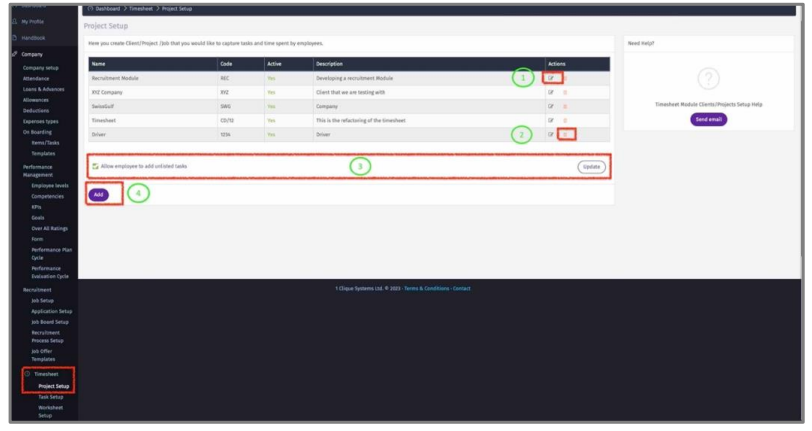
1 – Click on the edit icon to update Projects from existing list.
2 – Delete existing Projects by Clicking on the delete icon.
3 - Check the box to allow employees to add projects that are not part of this list.
4 – Click on “Add” to add a new Project/Client/ Business Unit.
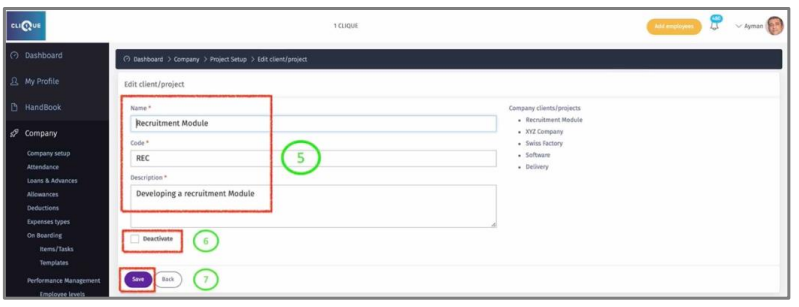
5 – Enter the Project information.
6 – Check the “Deactivate” Box so employees do not find it in the dropdown list.
7 – Click “Save” To update.