tasksetup
Task Setup
1 – Click on the edit icon to update Tasks from existing list.
2 – Delete existing Projects by Clicking on the delete icon.
3 – View “Billable” status of each task.
4 – Click on “Add” to add a new Tasks/Items/Activities.

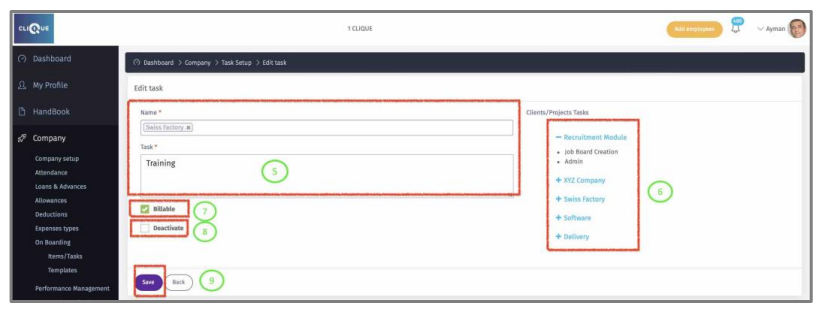
5 – Select Project(s) that this Task belongs to and enter the information.
6 – All list of all existing projects and related task will be displayed here.
7 – Check this box if this Task is Billable (Company Charging the employee time to its client).
8 - Check the “Deactivate” Box so employees do not find it in the dropdown list.
9 - Click “Save” To update.