Import Employees
Here you can upload all employees’ data or additional employees. If you have a large number of employees that you want to add to the system and adding them one employee at a time is time consuming, then this feature will be able to do that.
1 – Here you can do one of the following:
o Delete all existing employees (See point 2).
o Add additional employees to the existing one.
2- If you want to delete all existing employees and re-uploading them again , then click on “Delete Imported Data”. All existing data will be erased. To add them again then follow point 3, 4 & 5.
3 – To perform a mass upload of employee data, then click on “Download Excel Template”.
4 – Once the excel sheet is filled and completed, then click on “Upload Excel Sheet here” and select the file. Once uploaded, all add employees will be available in the system.
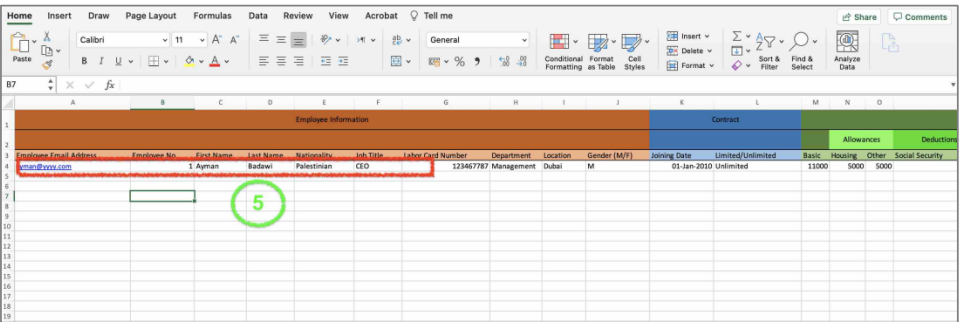
5 – The excel sheet will always display the data of the owner of your company account,
so if the purpose of this exercise is to re-enter all existing employees, then you should keep the displayed data. However, if you are adding additional employees, then you need to delete the account owner data and just add new employees.