Setup
To utilize the Loans & Advances Module, you need to go first to:
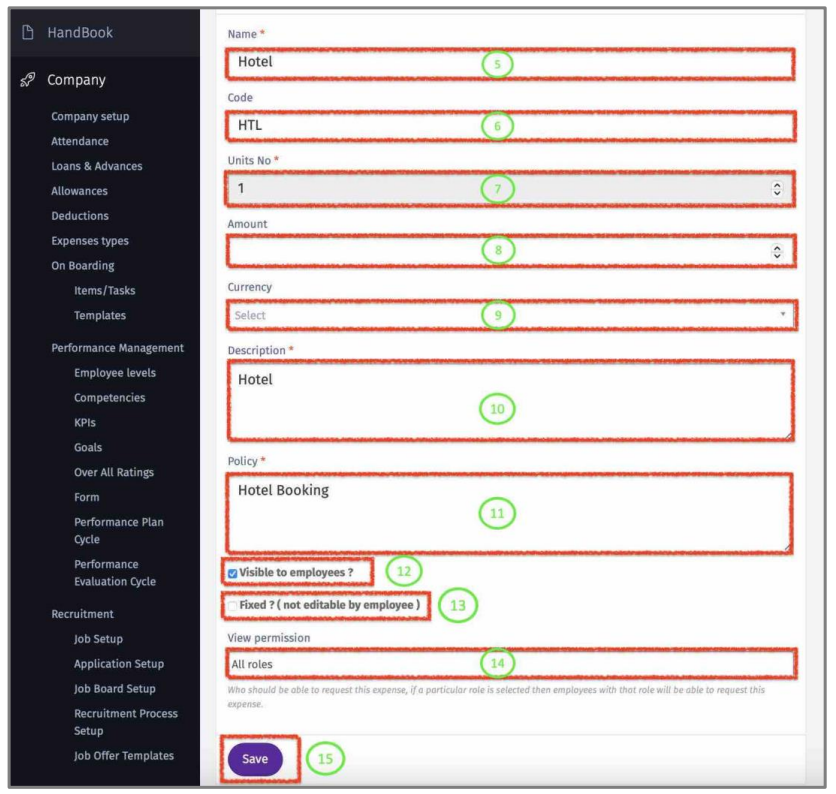
Company/ Expenses
Here you define the types of Company Expenses and methods of payment.
Expenses Type
1 – View all existing company expenses.
2 – Edit/Delete company expense. (If “Delete” button is disabled, that means this expense type has history and can’t be deleted)
3 – Check this box and click on “Update” to allow employee to add an expense that is not in the above list.
4 – Click on “New Expense” to create a new expense type
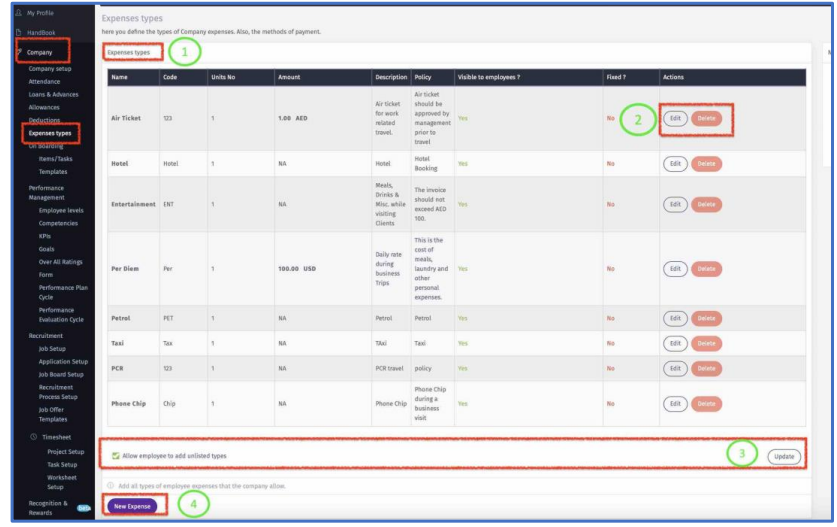
5 - Create a name to the new Expense Type.
6 - Add Code (optional).
7 – Add a default Unit No (minimum 1).
8 – Add an amount that will show as a default when this expense is selected by
employee.
9 – Add a default currency for this Expense Type.Can be left empty.
10 - Add a description /definition of the Expense Type.
11 - Enter the company policy regarding this Expense Type. This policy is viewed by employees.
12 – Chick this box to make it visible to employee when selecting an Expense Type.
13 – Check this box to ensure all default values cannot be edited by employee.
14 – Select ‘All roles” or Specific ones to ensure that only employees with those role (User Rights/Roles) can view and request.
15 – Click “Save” to update.