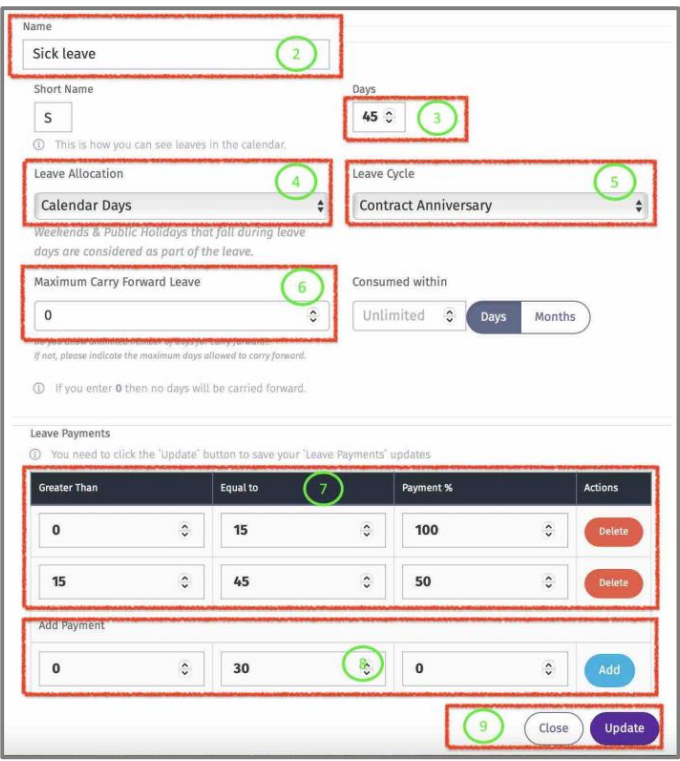
Edit Leave
Here default Leave Types can be modified.
1 – Click on “Edit” to view default setting for that Leave Type.
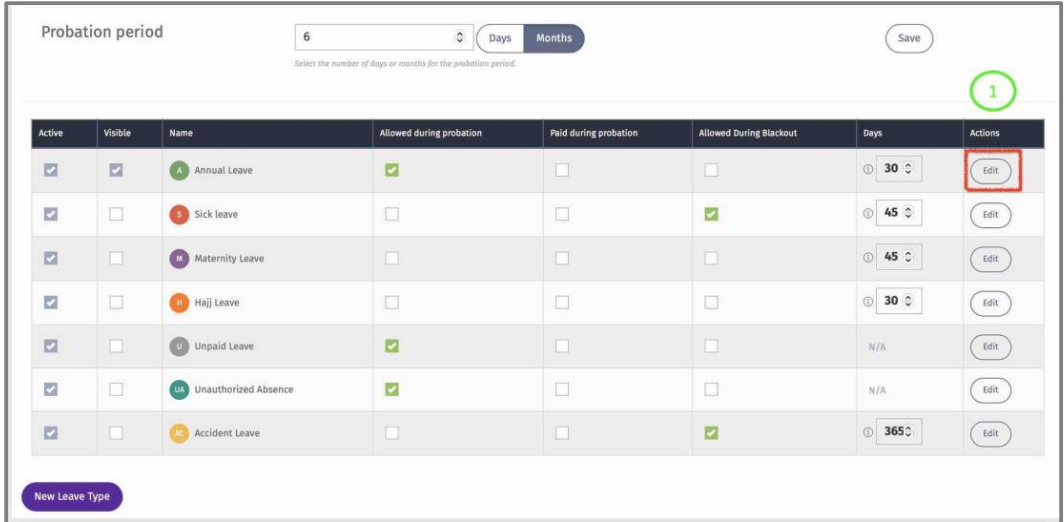
2 – Edit the name of the Leave Type.
3 – Edit the default Leave Entitlement.
4 – Define the Leave Allocation from the dropdown list (Working or Calendar days).
5 – Define the Leave default leave Cycle for this Leave Type from the dropdown list.
6 – define the Maximum days allowed to carry forward from one leave Cycle to another.
7 – Define the Payment brackets for this Leave Type. (The example below shows that the employee with earn full pay for the first 15 days and 50% will be paid for the next 30 days. The Payment % is the amount that the employee will be paid, not the deducted amount)
8 – Click on “Add” to add another bracket. (Don’t add another bracket if the payment % is 0 as it is
not required)
9 – Click on “Update” to save changes. Click on “Close’ once the update is successful.