Employee
Here an employee can request a Loan & Advance from his/her account.
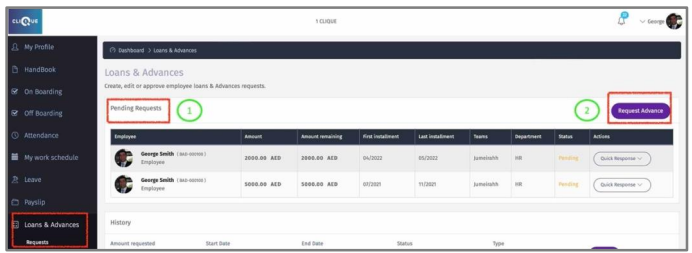
1 – View pending request that were submitted.
2 – Click “New Advance” to request a new advance.
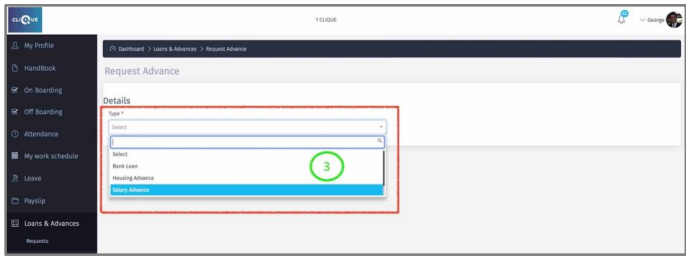
3 – Select from the dropdown list the required Advance.
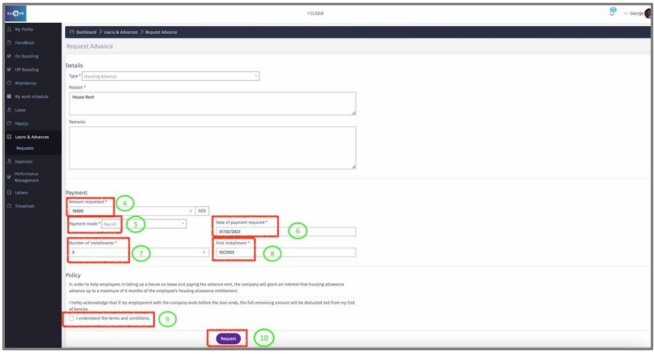
4 – Enter the request Amount.
5 – Payment Mode: How the employee would like to receive the requested amount? If
employee selects “Payroll” then the requested amount will go to payroll and will be paid
during the payroll run.
6 – Enter the date that employee would like to receive the advance (this applies for
payment mode that is not ‘Payroll”).
7 – Add the number of monthly installments to be deducted from employee payroll.
8 – Select the Payroll Month that the company will start deducting monthly installments.