Adjustments
Here you can adjust employee accrued days for any type of leave. The adjustment can be
performed at employee leave dashboard or in Adjustments.
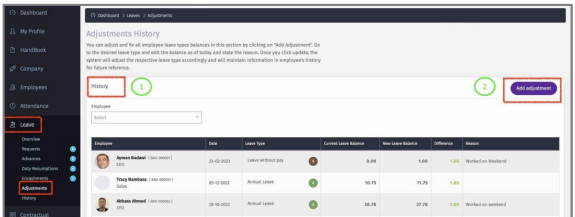
1 – View all adjustments history.
2 – Click on ‘Add Adjustment” to amend employee leave type balance.
3 – Select employee.
4 – Click “Edit” to amend the leave balance of this Leave Type.
5 – Current leave balance.
6 – Enter the new balance and add a reason.
7 – Click “Update” to save changes.
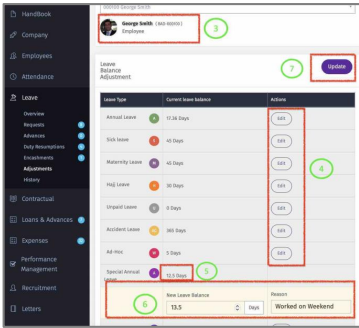
8 – The changes will appear in adjustments history & in employee dashboard leave
history.
