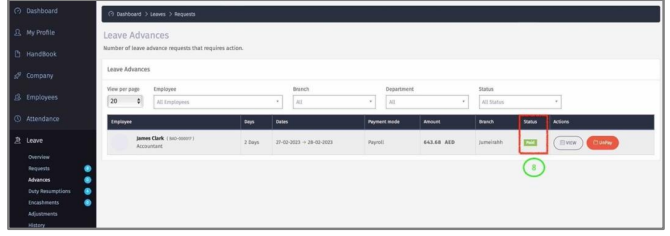
Advances
Here Manager/HR can pay employee leave advance. The leave advance can be requested at
leave application or leave approval level.
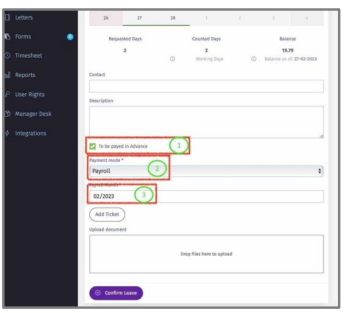
1 – Option 1: when the leave is being requested, the “To be paid in advance” check box has to be checked.
2 – Select the payment mode from the dropdown list. If Payroll is selected, then the
amount will be credited to employee on the selected payroll run.
3 – Select the Payroll month for the amount to be credit to in the payroll run.
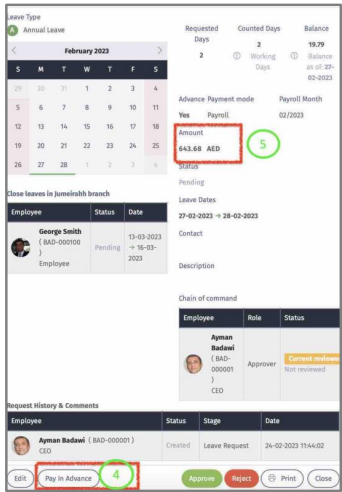
4 – Option 2: Manager when viewing leave request can click on “Pay In Advance” to
initiate this payment.
5 – The total leave advance will be displayed here.
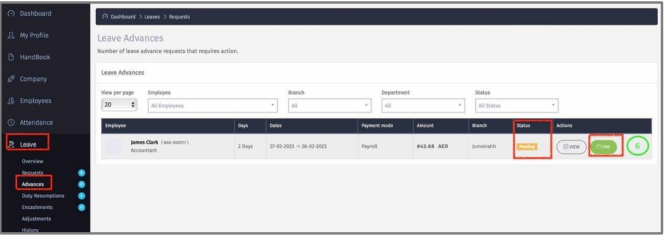
6 – Once the leave is approved. The leave advance will appear in “Advances”. Click “Pay”
to be added to payroll run.
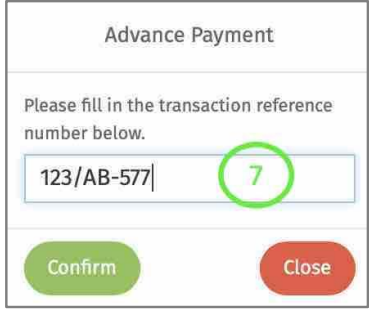
7 – Enter reference and confirm.
8 – Once confirmed, the status will change to ‘Paid’.