Employee Config
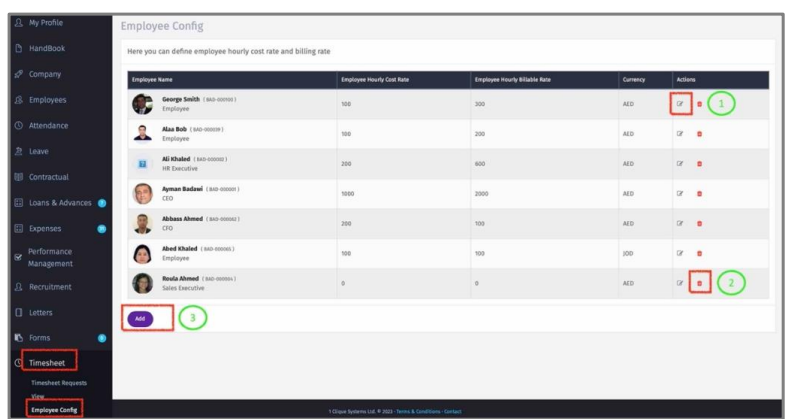
1 – Click on the edit icon to update the employee Timesheet Configuration.
2 – Delete existing Employee Configuration.
3– Click on “Add” to add an employee configuration.
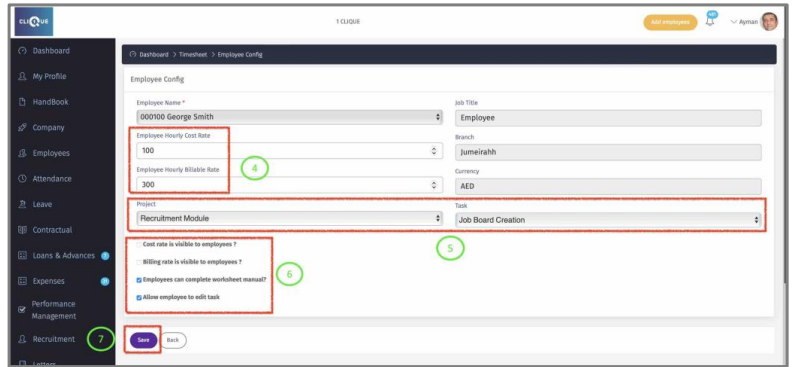
4 – Select the employee and add:
o Employee Hourly Cost Rate (amount that employee will be paid)
o Employee Hourly Billable Rate (Amount that will be charged to a 3rd party).
5 – Set default Project & Task to appear every time the employee adds a task. Employee will be able to edit the default Project/Task.
6 – Check the Boxes that needs to be activated for this employee.
7 – Click on “Save” to add employee configuration.