Timesheet Request
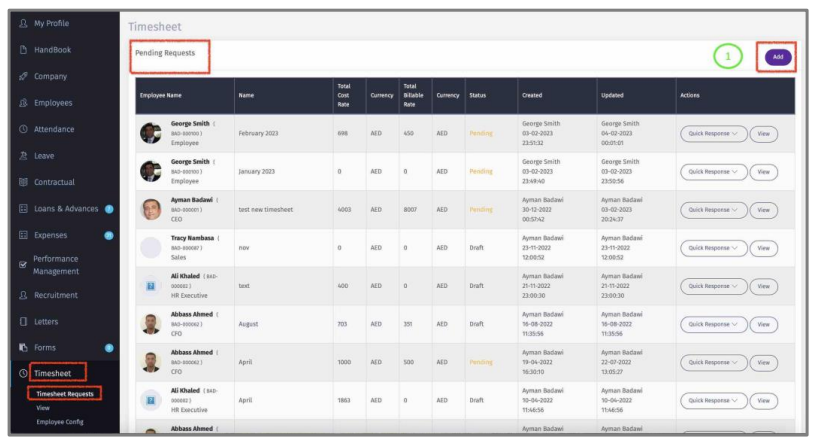
Here Manager/HR can view and attend to Pending Timesheet requests.
1 – Click “Add” to create a Timesheet for self or on behalf of employee. View Employee section.
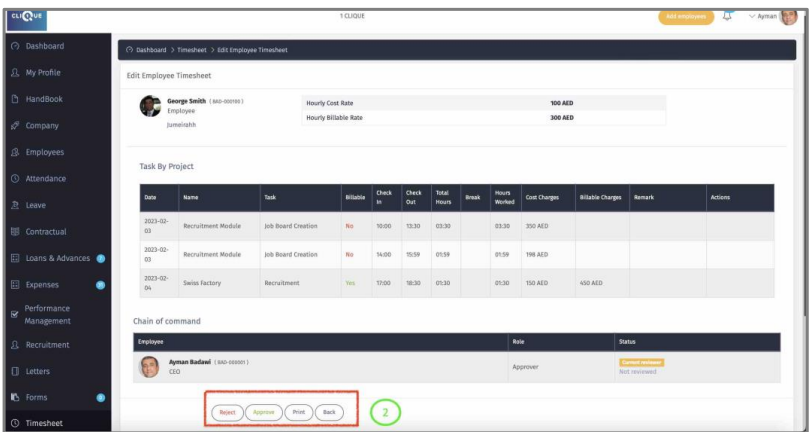
2 - Manager can Approve Reject/Print request.
3 – Once request is Approved, Click on “Quick Response” to:
o Print the request.
o Pay: Process the payment

4 – In History section you can view all paid requests. Click on “Quick Response” to:
o Print Request
o Disapprove Timesheet. If Timesheet is disapproved, then transaction will be
removed from Payroll Adjustment. Yet, If adjustment is already approved , then the adjustment needs to be disapproved first before disapproving the time sheet.
